
Cowboy Spin Casino Account - Register, Login & Verify in Minutes
This page covers the full account lifecycle at Cowboyspin: creating an account, accessing it on subsequent visits, recovering access when credentials are forgotten, completing identity verification, managing security settings and closing the account if needed. Most players arrive looking for one specific step in this sequence, so each section is written to stand independently rather than requiring you to read everything before finding what's relevant.
The Cowboy Spin screenshots available for this guide show the main casino interface, the navigation menu and the bonus pages - but not the registration form, login screen or KYC document upload interface specifically. Where the platform's documented terms and disclosed policies don't clarify a specific UI detail, that's noted rather than filled in with assumptions. The documented facts from Cowboy Spin's terms and conditions are the basis for everything that follows.
For context on what Cowboyspin is as a platform - its license, operator, games and payment methods - the Cowboyspin Casino overview covers those topics separately. This page focuses on the account-level mechanics.
Account Management Quick Reference
| Parameter | Value |
|---|---|
| Minimum Age | 18+ (or higher local minimum) |
| Registration Fields | Email + password (minimum required) |
| Social Login (Google/Facebook) | Not confirmed by published data |
| Promo Code Field at Registration | Present; leave empty for welcome package |
| Email Confirmation | Required (valid email needed) |
| KYC Required Before Withdrawal | Yes |
| KYC Document Review Time | Within 24 hours of upload |
| Response Deadline if Documents Requested | 15 days |
| Two-Factor Authentication | Available in account settings |
| Password Recovery Method | Email-based |
| Account Deletion Method | Email to [email protected] |
| Self-Exclusion Options | 3 months to 5 years or indefinite |
| Dormant Account Fee | EUR 10/month after 12 months inactive |
| Single Account Policy | 1 per household, IP and device |
How to Register a New Account at Cowboyspin Casino
Opening a Cowboyspin account requires a valid email address, a password, and confirmation that you meet the minimum age requirement of 18 years (or the higher legal minimum in your jurisdiction). The registration form also includes a promo code field, which should be left empty if you want to receive the standard automatic welcome package - entering any promo code during this step redirects the account's welcome sequence away from the automatic multi-deposit bonus structure.
Registration at Cowboyspin takes a matter of minutes. The steps below reflect the standard sequence described in the platform's terms and the visible casino interface:
- Navigate to cowboyspincasino.com and click the Sign Up button in the upper right corner of the main page. The button is visible on both desktop and mobile layouts without requiring any prior navigation.
- Enter your email address - use one you have active access to, as password recovery and account notifications route through it. Enter a password. Cowboyspin hasn't publicly specified minimum password complexity requirements, so treat standard best practice (mixed characters, sufficient length) as your guide.
- If you have a referral or partner code from a specific campaign, enter it in the promo code field. If you're targeting the standard three-deposit welcome package, leave this field completely empty. Entering the codes 50HIGH or RELDAY here will block the welcome bonus.
- Check the age confirmation checkbox declaring you are 18 or older. This is a required step, not optional. Cowboyspin may request documentary proof of age at any subsequent point.
- Submit the form. A confirmation email is sent to the address provided. Follow the link in that email to activate the account. The link's validity window isn't publicly specified by Cowboyspin; treating it as time-limited and acting promptly is the safe approach.
Required Information for Cowboyspin Account Creation
The minimum required fields for registration are email address and password. Additional personal details - full name, date of birth, residential address - are collected as part of the KYC verification process that's required before the first withdrawal, rather than at the registration stage. This means an account can be created and deposits made before full personal details are submitted, but withdrawal access requires the complete verification cycle to close. Players who prefer to have verification done before depositing can initiate KYC document submission immediately after account creation.
Should You Enter a Promo Code During Cowboyspin Registration?
The welcome package at Cowboyspin is an automatic benefit that activates without any promo code at registration. Entering a promo code in the registration form diverts the account setup from the standard welcome sequence and attaches it to whatever offer corresponds to that code instead. The publicly confirmed active codes - 50HIGH for the Highroller Bonus and RELDAY for the Sunday Reload - are both intended for existing accounts, not new registrations. If you received a code from a specific partner or affiliate source and intend to use it, verify what it activates before entering it. If your goal is the standard EUR 1,500 + 250 free spins welcome package, the registration form's promo field should be left blank.
Age Confirmation at Cowboyspin: 18+ Requirement and What Happens If You Fail
The minimum age at Cowboyspin is 18 globally, with higher minimums applying in jurisdictions where local law sets a higher standard. The age confirmation at registration is a checkbox acknowledgment rather than an immediately verified document check - Cowboyspin can and does request proof of age at any point, including before the first deposit or during the KYC process. Accounts found to be operated by players under the minimum age are subject to closure and forfeiture of any associated funds. The responsibility for knowing the applicable minimum in your specific location sits with the player, as stated in the platform's terms.
How to Log In to Your Cowboyspin Casino Account
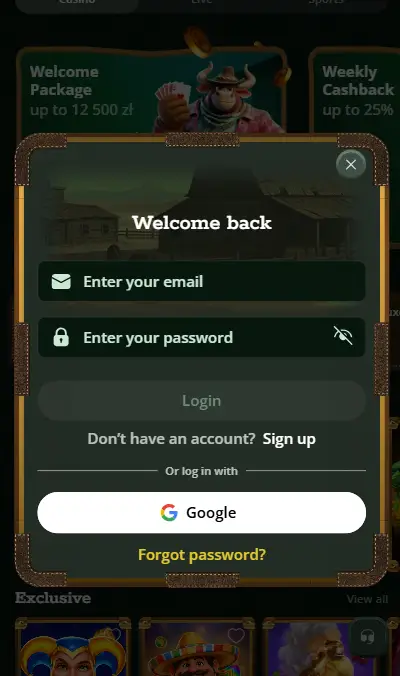
Logging in to Cowboyspin uses the email address and password entered during registration. The login button is located in the upper right corner of the main page on both desktop and mobile layouts, consistent with the standard casino interface design visible in the available screenshots. Entering the credentials correctly directs you to the main casino lobby and account dashboard.
Cowboyspin Login Fields: Email and Password Authentication
The login form requires your registered email address and the password set during account creation. Email addresses are case-sensitive in most systems, though Cowboyspin's specific handling isn't publicly documented - if login fails with correct credentials, trying all-lowercase for the email is a reasonable first troubleshooting step. Cowboyspin's terms don't confirm whether a "Remember Me" option is present on the login screen, so the UI detail here reflects a gap in confirmed data rather than a confirmed feature. Two-factor authentication, if enabled, would add a second step after password entry.
What to Do If You Cannot Log In to Cowboyspin Casino
Failed login attempts can result from misremembered credentials, a previously blocked account, or an email address that differs slightly from what was registered. If standard credential entry fails, use the password recovery function before contacting support. If you believe your account has been blocked - which can occur for inactivity, a KYC hold or a terms violation flag - contacting Cowboyspin support at [email protected] with your registered email is the appropriate channel. Provide your registered email address and a description of what you observe when attempting to log in to help the support team investigate efficiently.
How to Reset Your Cowboyspin Password If You Forgot It
Password recovery at Cowboyspin operates through a link sent to the registered email address. If you've lost access to your password, the recovery process begins at the login page rather than requiring a support interaction for standard cases.
Step-by-Step: Recovering Access to Your Cowboyspin Account via Email
Click the "Forgot Password" or equivalent link on the Cowboyspin login page. Enter the email address associated with your account. A message with a password reset link will be sent to that address; the delivery time depends on email server processing and typically arrives within a few minutes. Follow the link and follow the prompts to set a new password. If the email doesn't arrive within 10 minutes, check spam and junk folders before assuming it failed. The validity window for the reset link is not publicly specified by Cowboyspin; acting promptly after receiving the email is advisable.
What If the Cowboyspin Password Reset Email Does Not Arrive?
If the password reset email doesn't appear after checking spam folders, the registered email address may differ from the one you're entering. Common issues include adding a dot, a plus suffix or a slight typo that was present during original registration. If you genuinely cannot identify the registered address, contacting Cowboyspin support at [email protected] with any identifying account information - a deposit transaction reference, a date of first deposit or a username if one was created - can help locate the account and initiate a manual recovery process.
Cowboyspin KYC Verification: Documents, Timelines and Account Statuses
KYC (Know Your Customer) verification at Cowboyspin is mandatory before the first withdrawal. The process confirms the player's identity and address, matching documents against the registration data. Verification can be initiated proactively after account creation rather than waiting until a withdrawal is pending.
By our observation, players who complete KYC early - immediately after account creation rather than at the point of a first withdrawal request - avoid the frustration of having accessible funds held while documents are reviewed. The 24-hour review window for submitted documents is a standard commitment, not a guaranteed turnaround; complex cases or enhanced checks may take longer.
Which Documents Are Required for Cowboyspin Identity Verification?
The standard Cowboyspin KYC document set includes: a government-issued photo ID with both sides visible (passport or national identity card), a proof of address document dated within the past 6 months (a utility bill, bank statement or official government correspondence in your name), a selfie holding the open ID document with the face clearly visible, and a photograph of the front of any payment card used for deposits. Documents must be clear and legible; low-resolution images or partially obscured text are grounds for rejection. The submitted documents should match the name and address used during account registration exactly.
- Government-issued photo ID - both sides: passport information page and photo, or front and back of national ID card.
- Proof of address dated within 6 months: utility bill, bank statement or official document showing your name and residential address. Digital bank statements are typically accepted if they include account details.
- Selfie with open ID held near your face: the ID must be readable in the photo and the selfie must be recent.
- Payment card front (with middle digits masked if preferred): confirms the card belongs to the account holder.
How Long Does Cowboyspin Take to Verify Your Identity Documents?
Document review is targeted to complete within 24 hours of upload during normal processing periods. If the initial submission is straightforward - clear documents, matching data, no discrepancies - the turnaround typically stays within this window. If the verification system flags a concern or requests additional documentation, Cowboyspin will notify the player and a response is required within 15 days. Failing to respond to a documentation request within 15 days can result in account restrictions beyond the withdrawal hold. There is no published SLA for enhanced due diligence cases that involve source-of-funds checks or identity interviews.
Cowboyspin Verification Statuses: Approved, Rejected, Temporarily Approved
After submitting documents, the account enters one of four verification states. Approved means the review is complete and full account functionality is available including withdrawal processing. Rejected means the submitted documents didn't satisfy the verification requirements and new or corrected documents are needed. More Information Needed means additional documentation has been requested, and the player must respond within the 15-day window. Temporarily Approved is an intermediate state where the account remains usable but withdrawal rights may be limited pending additional review steps. Only Approved status removes all verification-related restrictions on the account.
When Can Cowboyspin Request Enhanced Due Diligence Beyond Standard KYC?
Cowboyspin reserves the right to expand verification beyond the standard document set at any point it deems necessary. Enhanced checks can include bank statements, payslips or other proof of employment, source-of-funds declarations explaining where deposited money originates, or even a video call via Skype or Zoom for identity confirmation. These expanded checks are most likely in situations involving large deposit volumes, unusual account activity patterns or withdrawal amounts that exceed certain thresholds. The specific triggers aren't published as a fixed policy, which means enhanced checks can be requested without prior warning.
Two-Factor Authentication at Cowboyspin: Enabling 2FA for Account Security
Two-factor authentication is available at Cowboyspin as an additional security layer on top of the standard email and password login. When enabled, logging in requires both the standard credentials and a time-based code generated by an authenticator app. This significantly reduces the risk of unauthorised access even if account credentials are compromised.
How to Enable Two-Factor Authentication on Your Cowboyspin Account
Log in to your Cowboyspin account and navigate to the account settings section. Within settings, locate the security or two-factor authentication subsection. The setup process involves linking an authenticator app - standard options include Google Authenticator, Authy or Microsoft Authenticator - by scanning a QR code displayed in the settings page. After linking, future login attempts will prompt for a code from the authenticator app in addition to the password. If you lose access to the authenticator app without having saved backup codes, account recovery becomes significantly more complex; saving backup codes at setup time is strongly advised.
Does 2FA at Cowboyspin Protect Against Unauthorised Login Attempts?
Enabling 2FA means that someone who obtains your Cowboyspin password cannot complete a login without also having physical access to your authenticator device. This is the primary protection 2FA provides. It doesn't protect against phishing (where you're tricked into providing the 2FA code yourself) or against device compromise (where the attacker has access to your phone). For most account security scenarios, 2FA provides substantial protection at minimal ongoing friction - the extra step at login is a few seconds. Cowboyspin's terms note that the casino isn't liable for unauthorised access resulting from credential disclosure by the player, which is the standard position across the industry; 2FA shifts the practical risk profile significantly in the player's favour.
Cowboyspin Account Dashboard: Managing Your Profile and Settings
The account dashboard at Cowboyspin is the central location for personal data management, payment history, responsible gambling tools and security settings. Access requires a standard login; the dashboard isn't accessible without authentication.
How to Change Your Password, Email and Personal Information at Cowboyspin
Password changes are handled directly within the account settings section. Entering the current password and setting a new one completes the change immediately. Email address changes may require re-verification of the new address. Personal details submitted during KYC - name, date of birth, address - are typically fixed after verification completes, as changing them would require re-verification against the new information. If you need to update core personal details, contacting support is the appropriate path.
Viewing Transaction History and Previous Game Activity at Cowboyspin
The account dashboard maintains a complete log of deposits, withdrawals and game sessions. This provides a record of all financial activity in the account, which is useful for personal tracking and for constructing documentation if a payment dispute arises. Game history is typically available for a defined retention period; the specific duration isn't published by Cowboyspin, but industry standard is between 90 days and 12 months of granular game-level data.
Responsible Gaming Controls Available in Your Cowboyspin Account
The responsible gambling tools at Cowboyspin are built into the account dashboard rather than requiring a separate support interaction to activate. The available controls cover spending limits, time limits and account exclusion.
How to Set Deposit and Loss Limits Through Your Cowboyspin Account
Navigate to the Responsible Gaming section within account settings. Deposit limits can be set for daily (24-hour), weekly (168-hour) or monthly (720-hour) periods. Entering a limit value and saving it creates the restriction. Reductions take immediate effect; increases are subject to a 24-hour delay before the higher limit activates. Loss limits cap total losses over a defined period and halt deposit access once the threshold is reached. Both limit types can coexist on the same account. The combination of a daily deposit limit and a weekly loss limit provides layered control for players who want spending bounds at multiple time scales.
Self-Exclusion Through the Cowboyspin Account: Periods and Reactivation Rules
Self-exclusion blocks all account access and prevents deposits and withdrawals for the chosen duration. The minimum period is 3 months; the maximum is 5 years. An indefinite exclusion option is also available. The exclusion does not reverse automatically - when a fixed-term exclusion expires, the account remains blocked until the player explicitly contacts support and completes the reactivation process (which includes a 24-hour cooling-off wait). Cancelling an indefinite exclusion requires a 7-day waiting period after the request before it takes effect. During any active self-exclusion, Cowboyspin takes steps to remove the player from marketing communications, though third-party affiliate emails received during the period are outside the casino's control.
How to Delete or Close Your Cowboyspin Casino Account
Account closure at Cowboyspin is handled via email to [email protected]. There is no self-service deletion option available in the account dashboard based on published documentation. The process involves a request by email, a potential final identity verification check by the casino, and then the formal closure of the account. Any remaining real-money balance is returned after deducting applicable withdrawal charges; bonus funds and wagering-locked winnings are forfeited at closure.
The Cowboyspin Account Closure Process: What to Expect After Requesting Deletion
After submitting a closure request, Cowboyspin may conduct one final KYC check even if the account was previously verified - the terms explicitly note this right, citing anti-fraud and AML obligations. The timing of the closure after the request is accepted isn't formally published. If you have a balance to withdraw, initiating and completing the withdrawal before submitting the closure request is advisable; attempting to close while funds are pending withdrawal adds a sequencing complication to the process.
Single Account Rule: Why Having Multiple Cowboyspin Accounts Is Not Permitted
Cowboyspin enforces a strict one-account-per-household, IP address and device policy. Attempting to open a second account - whether under the same or a different identity - can result in all associated accounts being closed and all associated balances, bonuses and winnings being forfeited. The policy extends to shared households: if two people in the same household each want a Cowboyspin account, they need to contact support to facilitate this within the rules rather than simply registering independently. Cowboyspin's terms require players to notify the casino immediately if they discover they have more than one registered account, even if it was created accidentally.
What Happens to Your Balance If Your Cowboyspin Account Is Blocked?
If Cowboyspin blocks or closes an account - whether due to a terms violation, a regulatory trigger or at the casino's discretion - the obligation to return the real-money balance remains. The method of repayment is at the casino's absolute discretion. Bonus funds and wagering-related winnings are forfeited at account closure. The terms state that Cowboyspin can close accounts without prior notice or stated reason, which gives the platform broad discretion on timing. Players whose accounts have been blocked should contact support via email with their account details to initiate the balance return process.
When Account Limitations at Cowboyspin May Become a Problem
The account system at Cowboyspin is functional and follows industry standards, but several specific scenarios generate genuine friction worth acknowledging upfront.
Players who use shared household internet or devices are immediately affected by the single-account-per-household policy. Two people at the same address wanting separate accounts need to notify and get approval from Cowboyspin rather than simply registering independently. Players who can't produce standard Western-format identity documents - for example, those without a fixed address or who use unconventional identification - may encounter difficulty completing KYC to Cowboyspin's satisfaction, because the system is designed around mainstream documentary verification. Players who forget which email address they used at registration and don't have access to it anymore face a support-dependent recovery process with no guaranteed timeline. And players who want a simple, immediate self-service account deletion without any email correspondence will find that Cowboyspin doesn't offer this - the closure process requires an email exchange and may involve additional identity checks before the account is actually closed. None of these are unusual for a licensed casino, but each represents a scenario where the standard process breaks down and the path to resolution involves support team dependency rather than account-level self-service.
Accounts at Cowboyspin: What Shapes Your Experience
The account mechanics at Cowboyspin follow the established pattern for licensed casinos: an accessible registration, a straightforward login, a KYC requirement that gates withdrawal access, and a set of responsible gambling tools accessible without friction. The areas where friction does appear are the promo code field (where entering anything blocks the welcome package), the 15-day document response deadline (which is firm), and the account closure path (which routes through email rather than self-service). Understanding these points before they become active issues shapes a smoother account experience.